What is the learning curve for operating an RFID label printer?
Leave a message

Operating an RFID label printer can be a valuable skill, especially in industries where efficient tracking and identification are crucial. As a supplier of RFID label printers, I understand the importance of providing clear information about the learning curve associated with these devices. In this blog post, I will explore the factors that influence the learning curve for operating an RFID label printer and provide some tips to help you get up to speed quickly.
Understanding RFID Technology
Before delving into the learning curve of operating an RFID label printer, it's essential to have a basic understanding of RFID technology. RFID, or Radio Frequency Identification, is a technology that uses electromagnetic fields to automatically identify and track tags attached to objects. An RFID system typically consists of an RFID reader, an antenna, and RFID tags. The tags contain electronically stored information that can be read from a distance without the need for direct line - of - sight contact.
Factors Affecting the Learning Curve
Technical Complexity of the Printer
RFID label printers come in various levels of complexity. Some basic models are relatively straightforward to operate, with simple interfaces and limited functionality. These printers are often a great option for small businesses or those with minimal RFID printing needs. For example, printers designed for basic label printing with simple RFID encoding capabilities can usually be mastered within a few hours of use.
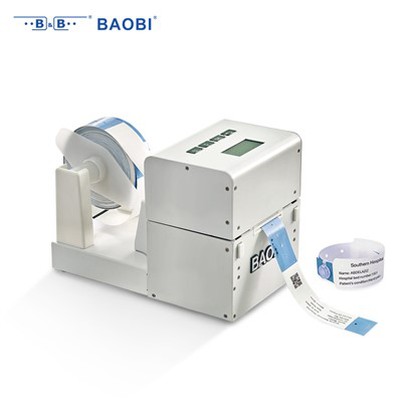
On the other hand, high - end RFID label printers, such as our RFID Label Printer, offer advanced features like high - speed printing, multiple encoding options, and integration with existing software systems. Operating these printers may require a more in - depth understanding of RFID technology and the printer's specific functions. Users may need to spend several days or even weeks familiarizing themselves with all the features and settings.
User's Prior Experience
A user's prior experience with similar equipment can significantly impact the learning curve. Someone who has previously worked with barcode printers or other printing devices may find it easier to adapt to an RFID label printer. The basic concepts of loading media, adjusting print settings, and troubleshooting common printing issues are often transferable.
However, for users with no prior experience in printing or RFID technology, the learning process may be more challenging. They will need to learn about RFID encoding, data formatting, and how to ensure accurate readability of the printed labels. It's important to provide comprehensive training and support for these users to help them overcome the initial learning hurdles.
Software and Integration
Most RFID label printers are accompanied by dedicated software that allows users to design labels, encode RFID tags, and manage printing jobs. The complexity of this software can vary widely. Some software is intuitive and user - friendly, with drag - and - drop interfaces and pre - designed label templates. These types of software can be learned quickly, even by novice users.
On the other hand, if the printer needs to be integrated with an existing enterprise resource planning (ERP) system or other business applications, the learning curve can increase significantly. Users may need to work with IT professionals to configure the software for seamless integration, which can take time and technical expertise.
Stages of the Learning Curve
Initial Familiarization
The first stage of the learning curve involves getting to know the physical components of the RFID label printer. This includes understanding how to load the label media and RFID tags, connect the printer to a computer, and power it on. Users also need to learn about the basic control panel functions, such as adjusting print speed and density.
During this stage, it's important to refer to the printer's user manual, which usually provides step - by - step instructions for setup and operation. Our RFID Wristband Printer BB720A HF comes with a detailed user manual that simplifies the initial familiarization process.


RFID Encoding Basics
Once the printer is set up and running, the next stage is to learn about RFID encoding. This involves understanding how to write data to the RFID tags. Users need to know how to format the data correctly, select the appropriate encoding protocol, and ensure that the data is written accurately to the tags.
Training materials and online resources can be very helpful during this stage. Many RFID label printer suppliers, including us, offer online tutorials and support to assist users in learning the basics of RFID encoding.
Advanced Features and Troubleshooting
As users become more comfortable with the basic operation and RFID encoding, they can start exploring the advanced features of the printer. This may include features like batch printing, variable data printing, and advanced encoding options.
Troubleshooting is also an important part of this stage. Users will need to learn how to identify and resolve common issues such as print quality problems, encoding errors, and connectivity issues. Our technical support team is always available to assist users in troubleshooting these problems, ensuring that they can make the most of their RFID label printer.
Tips to Shorten the Learning Curve
Comprehensive Training
Investing in comprehensive training is one of the best ways to shorten the learning curve. This can include on - site training by our experts or online training courses. During training, users can ask questions directly and get hands - on experience with the printer.
Practice with Sample Projects
Assigning sample projects to new users is an effective way to reinforce their learning. Starting with simple projects and gradually increasing the complexity can help users become more confident in operating the printer.
Utilize Online Resources
Our website provides a wealth of online resources, including user manuals, video tutorials, and FAQs. These resources can be accessed at any time, allowing users to learn at their own pace.
Conclusion
The learning curve for operating an RFID label printer can vary depending on several factors, including the technical complexity of the printer, the user's prior experience, and the software and integration requirements. However, with the right training, resources, and practice, users can quickly master the operation of an RFID label printer.
If you're interested in purchasing an RFID label printer or have any questions about the learning process, we're here to help. Our team of experts can provide you with detailed information, offer training options, and assist you in choosing the right printer for your needs. Contact us today to start the procurement process and take advantage of the benefits of RFID technology.
References
- RFID Journal. (n.d.). RFID Basics. Retrieved from RFID Journal website.
- Manufacturer's User Manuals for RFID Label Printers.