Is training required to use a wristband printer self - service terminal?
Leave a message

As a provider of wristband printer self-service terminals, I often encounter a question from potential customers: Is training required to use a wristband printer self-service terminal? In this blog, I'll explore this question in detail, considering various aspects of these terminals and their user-friendliness.
The Design Philosophy of Wristband Printer Self-service Terminals
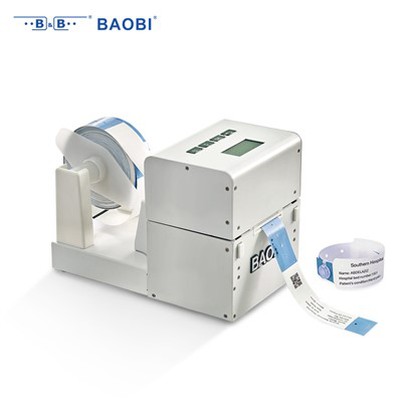
Modern wristband printer self-service terminals, such as the Wristband Printing Self-service Terminal BV8210 and the Wristband Printing Self-service Terminal BV8210 UHF, are designed with user convenience in mind. The developers understand that not all users will have a technical background, so they strive to make the operation as intuitive as possible.


The interface of these terminals is typically simple and straightforward. It usually consists of large, easy-to-understand icons and clear instructions. For example, when a user approaches the terminal, they are greeted with a main menu that clearly lists the available functions, such as printing wristbands, selecting different wristband designs, and adjusting printing settings. The touch-screen technology used in these terminals further enhances the user experience, allowing users to interact with the system just like they would with a smartphone or a tablet.
Basic Operation of Wristband Printer Self-service Terminals
Let's take a closer look at the basic operation of these terminals. To start with, the user needs to power on the terminal. Once the system boots up, they can select the type of wristband they want to print. This could be based on the event they are attending, such as a concert, a conference, or a theme park visit. The terminal will then prompt the user to enter relevant information, such as their name, ID number, or any other details that need to be printed on the wristband.
After entering the information, the user can preview the design of the wristband on the screen. This gives them a chance to make any necessary adjustments, such as changing the font, color, or layout. Once the user is satisfied with the preview, they can simply press the "Print" button, and the terminal will start printing the wristband.
The entire process is designed to be self-explanatory, and most users can figure it out without any prior training. However, there are some factors that might influence the need for training.
Factors Influencing the Need for Training
Complexity of the Terminal
While the basic operation of wristband printer self-service terminals is relatively simple, some models may have more advanced features. For example, the Wristband Printing Self-service Terminal BV8210 UHF may support UHF technology, which allows for more advanced functions such as contactless access control. In such cases, users may need some training to fully understand and utilize these features.
User Experience and Technical Skills
The need for training also depends on the user's experience and technical skills. For users who are familiar with touch-screen devices and have a basic understanding of technology, they may be able to operate the terminal without any training. On the other hand, users who are less tech-savvy may benefit from some basic training to ensure they can use the terminal effectively.
Specific Requirements of the Application
In some cases, the specific requirements of the application may also necessitate training. For example, if the wristbands are being used for a highly secure event, the terminal may have additional security features that need to be configured correctly. In such situations, training can help users understand how to set up and use these features to ensure the security of the event.
Benefits of Training
Even if the terminal is relatively easy to use, there are still several benefits to providing training to users.
Improved Efficiency
Training can help users become more familiar with the terminal's functions, which can lead to faster and more efficient operation. For example, users who are trained on how to use the terminal's advanced features can complete the printing process more quickly, reducing waiting times for other users.
Reduced Errors
Proper training can also help reduce errors. When users understand how to operate the terminal correctly, they are less likely to make mistakes, such as entering incorrect information or selecting the wrong settings. This can save time and resources in the long run.
Enhanced User Satisfaction
Providing training shows that you care about your customers and want to ensure they have a positive experience. When users are confident in their ability to use the terminal, they are more likely to be satisfied with the service, which can lead to increased customer loyalty.
Training Options
As a provider of wristband printer self-service terminals, we offer several training options to meet the needs of our customers.
On-site Training
We can send our trained technicians to your location to provide on-site training. This allows users to receive hands-on training and ask questions directly to the experts. On-site training is especially useful for large organizations or events where multiple users need to be trained.
Online Training
We also offer online training courses that users can access at their own convenience. These courses typically include video tutorials, step-by-step guides, and interactive quizzes to help users learn at their own pace. Online training is a cost-effective option for small businesses or individual users.
User Manuals and Documentation
In addition to training, we provide comprehensive user manuals and documentation that users can refer to. These materials contain detailed information about the terminal's functions, operation procedures, and troubleshooting tips.
Conclusion
In conclusion, while modern wristband printer self-service terminals are designed to be user-friendly and can be operated without training in many cases, there are situations where training can be beneficial. Factors such as the complexity of the terminal, the user's experience and technical skills, and the specific requirements of the application can influence the need for training.
As a provider of these terminals, we understand the importance of ensuring that our customers can use our products effectively. That's why we offer a range of training options to meet the diverse needs of our customers. Whether you need on-site training, online courses, or just a user manual, we've got you covered.
If you're interested in purchasing a wristband printer self-service terminal or have any questions about training, please feel free to contact us. We're here to help you make the most of our products and ensure a smooth and successful experience.
References
- Industry reports on self-service terminal technology
- User feedback and case studies from our customers