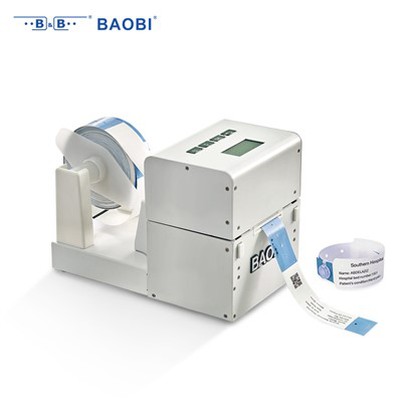
How to program a Healthcare RFID Wristband - UHF?
Leave a message

Hey there! As a supplier of Healthcare RFID Wristband - UHF, I'm super stoked to share with you how to program these nifty devices. RFID (Radio Frequency Identification) technology has been a game - changer in the healthcare industry, and UHF (Ultra - High Frequency) wristbands offer some unique advantages.
Understanding the Basics of Healthcare RFID Wristband - UHF
First off, let's get a quick lowdown on what these wristbands are all about. Healthcare RFID Wristbands are small, wearable devices that use radio waves to store and transmit data. The UHF ones operate in the ultra - high frequency range, which means they can communicate over longer distances and at faster speeds compared to other frequencies.
These wristbands are used in healthcare settings for a variety of purposes. They can be used to identify patients, track their movements within a hospital, manage medication administration, and even monitor vital signs. For example, when a patient is admitted to a hospital, they can be given a Healthcare RFID Wristband. The wristband can store the patient's personal information, medical history, and current treatment plan.
What You'll Need to Program a Healthcare RFID Wristband - UHF
Before you start programming, you'll need a few things.
- RFID Reader/Writer: This is the key piece of equipment. It's used to read the data from the wristband and write new data to it. Make sure you choose a reader/writer that is compatible with UHF RFID technology and the specific type of wristbands you're using.
- Software: You'll need software that can interface with the reader/writer. This software allows you to control the programming process, format the data, and manage the information stored on the wristbands.
- Data Source: You need a reliable source of data to program onto the wristbands. This could be a hospital's patient database, a spreadsheet with patient information, or any other system that stores the relevant data.
Step - by - Step Programming Process
Step 1: Prepare the Reader/Writer and Software
First, connect the RFID reader/writer to your computer. Make sure all the necessary drivers are installed. Then, open the programming software. Configure the software to communicate with the reader/writer. You may need to set the communication protocol, baud rate, and other parameters depending on the equipment you're using.
Step 2: Format the Wristband
Most RFID wristbands need to be formatted before you can write data to them. This process erases any existing data on the wristband and prepares it for new data storage. In the programming software, select the option to format the wristband. Place the wristband close to the reader/writer and follow the on - screen instructions to complete the formatting process.
Step 3: Enter the Data
Once the wristband is formatted, it's time to enter the data. You can either manually type in the data or import it from a data source. If you're importing data, make sure the data is in the correct format. The software usually allows you to map the fields in your data source to the fields on the wristband. For example, you can map the patient's name, ID number, and medical history to the appropriate areas on the wristband.
Step 4: Write the Data to the Wristband
After entering the data, it's time to write it to the wristband. In the programming software, select the option to write data. Place the wristband within the read/write range of the reader/writer. The software will then send the data to the wristband using radio waves. Once the writing process is complete, the software will usually display a confirmation message.


Step 5: Verify the Data
It's crucial to verify that the data has been written correctly to the wristband. Use the reader/writer to read the data from the wristband. Compare the data on the wristband with the original data source. If there are any discrepancies, you may need to repeat the writing process.
Troubleshooting Common Issues
Sometimes, things don't go as smoothly as planned. Here are some common issues you might encounter and how to fix them.
- No Communication with the Wristband: If the reader/writer can't communicate with the wristband, check the distance between the wristband and the reader/writer. Make sure the wristband is within the read/write range. Also, check if the wristband is damaged or if there are any interference sources nearby.
- Data Writing Errors: If you're having trouble writing data to the wristband, check the data format. Make sure the data you're trying to write is compatible with the wristband's storage capacity and data structure. You may also need to check the settings in the programming software.
- Incorrect Data Reading: If the data read from the wristband is incorrect, it could be due to a problem with the writing process or the reader/writer. Try writing the data again, and if the problem persists, check the calibration of the reader/writer.
Other Applications of RFID Wristbands
While we're mainly focused on healthcare, RFID wristbands have other cool applications too. For events, Event RFID Wristband - UHF and Event RFID Wristband are used for access control, ticketing, and tracking attendees. They can also be used in amusement parks for ride access and in sports events for athlete tracking.
Why Choose Our Healthcare RFID Wristband - UHF
As a supplier, we offer high - quality Healthcare RFID Wristband - UHF. Our wristbands are durable, reliable, and have a long battery life (if they're battery - powered). We also provide excellent customer support, so if you have any questions or run into issues during the programming process, our team is here to help.
If you're in the healthcare industry and looking for a reliable solution for patient identification and tracking, or if you're organizing an event and need RFID wristbands, we'd love to hear from you. Whether you're a small clinic or a large hospital, we can provide the right quantity and type of wristbands to meet your needs.
Conclusion
Programming a Healthcare RFID Wristband - UHF may seem a bit daunting at first, but with the right equipment, software, and a step - by - step approach, it's definitely doable. These wristbands have the potential to revolutionize the way healthcare is delivered and events are managed.
If you're interested in purchasing our Healthcare RFID Wristband - UHF or have any questions about programming or using them, don't hesitate to reach out. We're always happy to have a chat and discuss how we can help you with your RFID needs.
References
- RFID Journal. (2023). RFID in Healthcare: Transforming Patient Safety and Efficiency.
- Healthcare IT News. (2023). The Role of RFID in Modern Healthcare Systems.
- Event Tech Magazine. (2023). How RFID Wristbands are Changing the Event Industry.