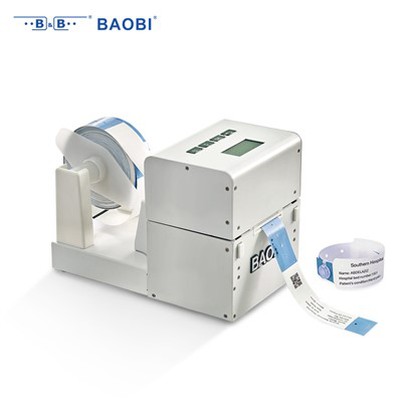
How do I troubleshoot printing issues on snap closure thermal printable wristbands?
Leave a message

Troubleshooting printing issues on snap closure thermal printable wristbands can be a real headache, but don't worry! As a supplier of Snap Closure Thermal Printable Wristbands, I've seen my fair share of problems and have learned a thing or two about getting the solution. In this blog, I'll share some common issues and how to fix them.
1. Faded or Blurry Prints
One of the most common problems you might encounter is faded or blurry prints. This can make the information on the wristband hard to read, which is a big no - no, especially in a healthcare or event setting.


Possible Causes and Solutions
- Low Printer Temperature: Thermal printers rely on heat to transfer ink onto the wristband. If the printer temperature is set too low, the ink won't transfer properly, resulting in faded prints. Solution: Check your printer settings and increase the temperature gradually. Print a test wristband after each adjustment until you get a clear, sharp print.
- Worn - Out Print Head: Over time, the print head of your thermal printer can wear out. A worn print head won't apply heat evenly, causing blurry or faded areas. Solution: Inspect the print head for any signs of damage or wear. If it looks worn, it's time to replace it. You can usually find replacement print heads from the printer manufacturer.
- Incompatible Wristbands: Not all thermal printable wristbands are created equal. If you're using wristbands that aren't compatible with your printer, you might end up with poor - quality prints. Solution: Make sure you're using Snap Closure Healthcare Thermal Printable Wristbands that are specifically designed for your printer model. Check the product specifications provided by the manufacturer.
2. Inconsistent Printing
Inconsistent printing means that some parts of the wristband have clear prints while others are faint or missing altogether. This can be frustrating, but it's usually fixable.
Possible Causes and Solutions
- Dirty Print Head: Dust, debris, or residue from the wristbands can accumulate on the print head, causing inconsistent heat transfer. Solution: Clean the print head regularly using a soft, lint - free cloth and a cleaning solution recommended by the printer manufacturer. Gently wipe the print head in one direction to remove any dirt.
- Uneven Wristband Surface: If the wristband surface is not smooth, it can lead to inconsistent printing. This could be due to manufacturing defects or improper storage. Solution: Inspect the wristbands for any visible defects before printing. If you notice a rough or uneven surface, discard those wristbands. Also, store your wristbands in a cool, dry place to prevent warping.
- Paper Feed Issues: Problems with the paper feed mechanism can cause the wristbands to move unevenly through the printer, resulting in inconsistent prints. Solution: Check the paper path in the printer for any obstructions. Make sure the wristbands are loaded correctly and that the printer's paper guides are adjusted properly.
3. Misaligned Prints
Misaligned prints can occur when the text or image on the wristband is not centered or is printed at an angle. This can make the wristbands look unprofessional.
Possible Causes and Solutions
- Incorrect Printer Settings: If the printer settings for paper size or alignment are incorrect, the prints will be misaligned. Solution: Double - check the printer settings and make sure they match the dimensions of the snap closure thermal printable wristbands. You may need to adjust the margins or alignment options in the printer software.
- Wristband Placement: Improper placement of the wristbands in the printer can also cause misaligned prints. Solution: Follow the printer's instructions for loading the wristbands. Make sure they are placed flat and straight in the paper tray.
- Mechanical Issues: Sometimes, there could be a mechanical problem with the printer, such as a loose belt or a misaligned roller. Solution: If you suspect a mechanical issue, it's best to contact a professional printer technician. They can diagnose and fix the problem for you.
4. Ink Smudging
Ink smudging is another annoying problem that can make the wristbands look messy.
Possible Causes and Solutions
- Wet or Humid Conditions: High humidity or wet wristbands can cause the ink to smudge. Solution: Store your wristbands in a dry environment and avoid printing in humid conditions. If the wristbands get wet, let them dry completely before printing.
- Incorrect Drying Time: Some thermal inks need time to dry properly. If you handle the wristbands too soon after printing, the ink can smudge. Solution: Wait for the recommended drying time before handling the printed wristbands. This time can vary depending on the printer and the type of wristband.
- Poor - Quality Wristbands: Low - quality wristbands may not hold the ink well, leading to smudging. Solution: Invest in high - quality Snap Closure Thermal Printable Wristbands from a reputable supplier. They are more likely to have a better surface for ink adhesion.
5. Printing Errors or Jams
Printing errors or jams can stop the printing process and waste your time and materials.
Possible Causes and Solutions
- Software Glitches: Sometimes, the printer software can have bugs or glitches that cause printing errors. Solution: Update the printer software to the latest version. You can usually find the software updates on the printer manufacturer's website.
- Paper Jams: Wristbands can get jammed in the printer if they are not loaded correctly or if there is an obstruction in the paper path. Solution: Turn off the printer and carefully remove any jammed wristbands. Make sure to follow the printer's instructions for clearing paper jams. Check for any debris or foreign objects in the paper path and remove them.
- Hardware Problems: A malfunctioning printer component, such as a motor or a sensor, can also cause printing errors or jams. Solution: If you've tried all the software and paper - related solutions and the problem persists, it's time to contact the printer manufacturer's support team. They can help you diagnose and fix the hardware issue.
Conclusion
Troubleshooting printing issues on snap closure thermal printable wristbands may seem daunting at first, but with a little knowledge and patience, you can overcome these problems. By understanding the common causes and their solutions, you can ensure that your wristbands are printed with high quality every time.
If you're in the market for high - quality snap closure thermal printable wristbands or Adhesive Closure Healthcare Thermal Printable Wristbands, we're here to help. We offer a wide range of wristbands that are compatible with most thermal printers, ensuring clear and sharp prints. Whether you're organizing an event or running a healthcare facility, our wristbands can meet your needs.
If you have any questions or would like to discuss your procurement requirements, feel free to reach out. We're always happy to assist and look forward to working with you!
References
- Manufacturer's guides for thermal printers.
- Industry best practices for thermal printing on wristbands.